요구사항
- 상품을 관리
- 상품이름
- 첨부파일 하나
- 이미지파일 여러개
- 첨부파일을 업로드 및 다운로드 가능
- 업로드한 이미지 웹브라우저에서 확인 가능
Item 상품 도메인
package com.changddao.springupload.domain;

import lombok.Data;

import java.util.List;

@Data
public class Item {
    private Long id;
    private String itemName;
    private UploadFile attachFile;
    private List<UploadFile> imageFiles;

}
**ItemRepository 상품 저장소
package com.changddao.springupload.domain;

import org.springframework.stereotype.Repository;

import java.util.HashMap;
import java.util.Map;

@Repository
public class ItemRepository {
    private final Map<Long, Item> store = new HashMap<>();
    private long sequence = 0L;

    public Item save(Item item) {
        item.setId(sequence++);
        store.put(item.getId(), item);
        return item;
    }

    public Item findById(Long id) {
        Item findItem = store.get(id);
        return findItem;
    }
}
UploadFile 업로드 파일 정보 DTO
package com.changddao.springupload.domain;

import lombok.Data;

@Data
public class UploadFile {
    private String uploadFileName;
    private String storeFileName;

    public UploadFile(String uploadFileName, String storeFileName) {
        this.uploadFileName = uploadFileName;
        this.storeFileName = storeFileName;
    }
}
uploadFileName : client가 업로드한 파일명
storeFileName : 실제 서버에 저장될 파일명
client가 업로드한 파일명으로 서버에 파일을 저장하면 안된다. 왜냐하면 서로 다른 고객이 동일한 파일명으로 업로드 할 수 있어, 충돌이 날 수 있기 때문이다. 서버에 저장할 파일명은 UUID를 이용한다면 파일명을 겹치지 않게 저장할 수 있다. 아래 코드를 보자.
FileStore 파일저장의 역할을 수행
package com.changddao.springupload.file;

import com.changddao.springupload.domain.UploadFile;
import org.springframework.beans.factory.annotation.Value;
import org.springframework.stereotype.Component;
import org.springframework.web.multipart.MultipartFile;

import java.io.File;
import java.io.IOException;
import java.util.ArrayList;
import java.util.List;
import java.util.UUID;

@Component
public class FileStore {
    @Value("${file.dir}") //application.properties에 file.dir로 지정해둔 값이 fileDir에 담김
    private String fileDir;

    public String getFullPath(String filename) {
        return fileDir + filename;
    }
    public List<UploadFile> storeFiles(List<MultipartFile> multipartFiles) throws IOException {
        List<UploadFile> storeFileResult = new ArrayList<>();
        for (MultipartFile multipartFile : multipartFiles) {
            if (!multipartFile.isEmpty()) {
                UploadFile uploadFile = storeFile(multipartFile);
                storeFileResult.add(uploadFile);
            }
        }
        return storeFileResult;
    }

    public UploadFile storeFile(MultipartFile multipartFile) throws IOException {
        if (multipartFile.isEmpty()) {
            return null;
        }
        String originalFilename = multipartFile.getOriginalFilename();
        //서버에 저장하는 파일명
        String storeFilename = createStoreFilename(originalFilename);
           multipartFile.transferTo(new File(getFullPath(storeFilename)));
        return new UploadFile(originalFilename, storeFilename);
    }

    private String createStoreFilename(String originalFilename) {
        String ext = extractExt(originalFilename);
        String uuid = UUID.randomUUID().toString();
        return uuid + "." + ext;
    }

    private String extractExt(String originalFilename) {
        int point = originalFilename.lastIndexOf(".");
        return  originalFilename.substring(point + 1);
    }

}
멀티파트 파일을 서버에 저장하는 역할을 담당한다.createStoreFileName() : 서버 내부에서 관리하는 파일명은 유일한 이름을 생성하는 UUID 를 사용해서 충돌하지 않도록 한다.extractExt() : 확장자를 별도로 추출해서 서버 내부에서 관리하는 파일명에도 붙여준다. 예를 들어서 고객이 a.png 라는 이름으로 업로드 하면 51041c62-86e4-4274-801d-614a7d994edb.png 와 같이 저장한다.
ItemForm
package com.changddao.springupload.controller;

import lombok.Data;
import org.springframework.web.multipart.MultipartFile;

import java.util.List;

@Data
public class ItemForm {
    private Long itemId;
    private String itemName;
    private MultipartFile attachFile;
    private List<MultipartFile> imageFiles;
}
**ItemController
package com.changddao.springupload.controller;

import com.changddao.springupload.domain.Item;
import com.changddao.springupload.domain.ItemRepository;
import com.changddao.springupload.domain.UploadFile;
import com.changddao.springupload.file.FileStore;
import lombok.RequiredArgsConstructor;
import lombok.extern.slf4j.Slf4j;
import org.springframework.core.io.Resource;
import org.springframework.core.io.UrlResource;
import org.springframework.http.HttpHeaders;
import org.springframework.http.ResponseEntity;
import org.springframework.stereotype.Controller;
import org.springframework.ui.Model;
import org.springframework.web.bind.annotation.*;
import org.springframework.web.multipart.MultipartFile;
import org.springframework.web.servlet.mvc.support.RedirectAttributes;
import org.springframework.web.util.UriUtils;

import java.io.IOException;
import java.net.MalformedURLException;
import java.nio.charset.StandardCharsets;
import java.util.List;

@Slf4j
@Controller
@RequiredArgsConstructor
public class ItemController {

    private final ItemRepository itemRepository;
    private final FileStore fileStore;

    @GetMapping("/items/new")
    public String newItem(@ModelAttribute ItemForm form) {
        return "item-form";
    }
    @PostMapping("/items/new")
    public String saveItem(@ModelAttribute ItemForm form, RedirectAttributes redirectAttributes) throws IOException {
        MultipartFile attachFile = form.getAttachFile();
        UploadFile uploadFile = fileStore.storeFile(attachFile);

        List<MultipartFile> imageFiles = form.getImageFiles();
        List<UploadFile> storeImageFiles = fileStore.storeFiles(imageFiles);

        //데이터베이스에 저장
        Item item = new Item();
        item.setItemName(form.getItemName());
        item.setAttachFile(uploadFile);
        item.setImageFiles(storeImageFiles);
        itemRepository.save(item);

        redirectAttributes.addAttribute("itemId", item.getId());
        return "redirect:/items/{itemId}";
    }
    @GetMapping("/items/{id}")
    public String items(@PathVariable Long id, Model model) {
        Item item = itemRepository.findById(id);
        model.addAttribute("item", item);
        return "item-view";
    }
    @ResponseBody
    @GetMapping("/images/{filename}")
    public Resource downloadImage(@PathVariable String filename) throws MalformedURLException {
      return new UrlResource("file:" + fileStore.getFullPath(filename));
    }

    @GetMapping("/attach/{itemId}")
    public ResponseEntity<Resource> downloadAttach(@PathVariable Long itemId) throws MalformedURLException {
        Item item = itemRepository.findById(itemId);
        String storeFileName = item.getAttachFile().getStoreFileName();
        String uploadFileName = item.getAttachFile().getUploadFileName();

        UrlResource resource = new UrlResource("file:" + fileStore.getFullPath(storeFileName));

        log.info("uploadFileName={}", uploadFileName);
        String encodeUploadFileName = UriUtils.encode(uploadFileName, StandardCharsets.UTF_8);
        String contentDisposition = "attachment; filename=\""+encodeUploadFileName+"\"";

        return ResponseEntity.ok()
                .header(HttpHeaders.CONTENT_DISPOSITION, contentDisposition)
                .body(resource);

    }
}
@GetMapping("/items/new") : 등록 폼을 보여준다.@PostMapping("/items/new") : 폼의 데이터를 저장하고 보여주는 화면으로 리다이렉트 한다. @GetMapping("/items/{id}") : 상품을 보여준다.@GetMapping("/images/{filename}") : <img> 태그로 이미지를 조회할 때 사용한다. UrlResource 로 이미지 파일을 읽어서 @ResponseBody 로 이미지 바이너리를 반환한다. @GetMapping("/attach/{itemId}") : 파일을 다운로드 할 때 실행한다. 예제를 더 단순화 할 수 있지만,파일 다운로드 시 권한 체크같은 복잡한 상황까지 가정한다 생각하고 이미지 id 를 요청하도록 했다. 파일 다운로 드시에는 고객이 업로드한 파일 이름으로 다운로드 하는게 좋다. 이때는 Content-Disposition 해더에attachment; filename="업로드 파일명" 값을 주면 된다.
등록 폼 뷰resources/templates/item-form.html
<!DOCTYPE HTML>
<html xmlns:th="http://www.thymeleaf.org">
<head>
    <meta charset="utf-8">
</head>
<body>

<div class="container">

    <div class="py-5 text-center">
        <h2>상품 등록</h2>
    </div>

    <form th:action method="post" enctype="multipart/form-data">
        <ul>
            <li>상품명 <input type="text" name="itemName"></li>
            <li>첨부파일<input type="file" name="attachFile" ></li>
            <li>이미지 파일들<input type="file" multiple="multiple" name="imageFiles" ></li>
        </ul>
        <input type="submit"/>
    </form>

</div> <!-- /container -->
</body>
</html>
다중 파일 업로드를 하려면 multiple="multiple" 옵션을 주면 된다. ItemForm 의 다음 코드에서 여러 이미지 파일을 받을 수 있다. private List<MultipartFile> imageFiles;
조회 뷰resources/templates/item-view.html
<!DOCTYPE HTML>
<html xmlns:th="http://www.thymeleaf.org">
<head>
    <meta charset="utf-8">
</head>
<body>

<div class="container">

    <div class="py-5 text-center">
        <h2>상품 조회</h2>
    </div>

    상품명: <span th:text="${item.itemName}">상품명</span><br/>
    첨부파일: <a th:if="${item.attachFile}" th:href="|/attach/${item.id}|" th:text="${item.getAttachFile().getUploadFileName()}" /><br/>
    <img th:each="imageFile : ${item.imageFiles}" th:src="|/images/${imageFile.getStoreFileName()}|" width="300" height="300"/>

</div> <!-- /container -->
</body>
</html>
이제 모든 뷰와 Controller 및 FileSotre까지 모든 준비는 끝났다.
서버를 실행하여 테스트를 진행해보자!!

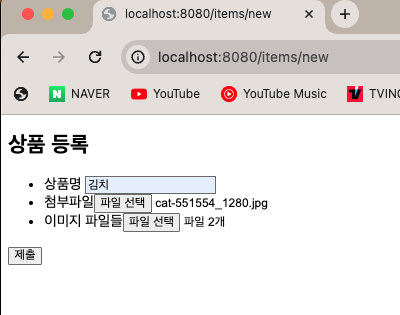
제출 버튼을 클릭하면?
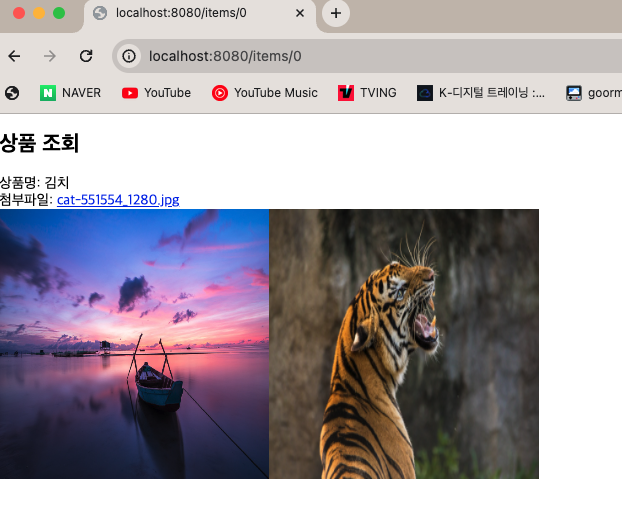
이미지 업로드가 잘되는 것을 확인할 수 있다.
그리고 마지막으로 파일을 다운로드 해보자

파일 다운로드까지 잘 되는 것을 확인할 수있다.
'Spring & SpringBoot' 카테고리의 다른 글
| @ExceptionHandler를 이용한 API 오류처리 (2) | 2023.12.08 |
|---|---|
| 스프링부트를 사용해야 하는 이유 (0) | 2023.12.04 |
| Spring이용하여 File 업로드 하기 및 File Download(1) (0) | 2023.12.03 |
| Spring Bean @Validation (2) | 2023.12.03 |
| 스프링 빈의 Life Cycle (1) | 2023.12.02 |


